This guide is for flight instructors using PilotIQ to teach theory, track student readiness and certify flights — whether you're at a school on PilotIQ or working with students directly.
1. Create your instructor account
- At pilotiq.com.au, choose Create your free account and sign up as an instructor.
- Add your details, including your instructor number and pilot identifier (ARN / certificate number / licence number / service number), in Settings — these appear on the endorsements you certify.
2. Join your organisation
If you instruct at a school that uses PilotIQ:
- Sign in and request to join your organisation (select it during sign‑up or from your dashboard).
- The school approves you — each active instructor is a seat in their account.
- Once approved, you'll see the school's students, courses and tools.
3. Deliver lessons
From your organisation's workspace you can deliver theory lessons to your cohort:
- Release lessons one at a time, or in bulk by knowledge area.
- Students receive them in their Course and theory library, and get a notification.
- Every lesson has a branded, present‑in‑browser slide deck (and a downloadable PowerPoint) you can teach from.
4. Add your local procedures
Capture your school's circuit directions, fleet checklists and local airspace notes as local procedures — they're presented to your students alongside the base theory, clearly badged as yours.
5. Track student readiness
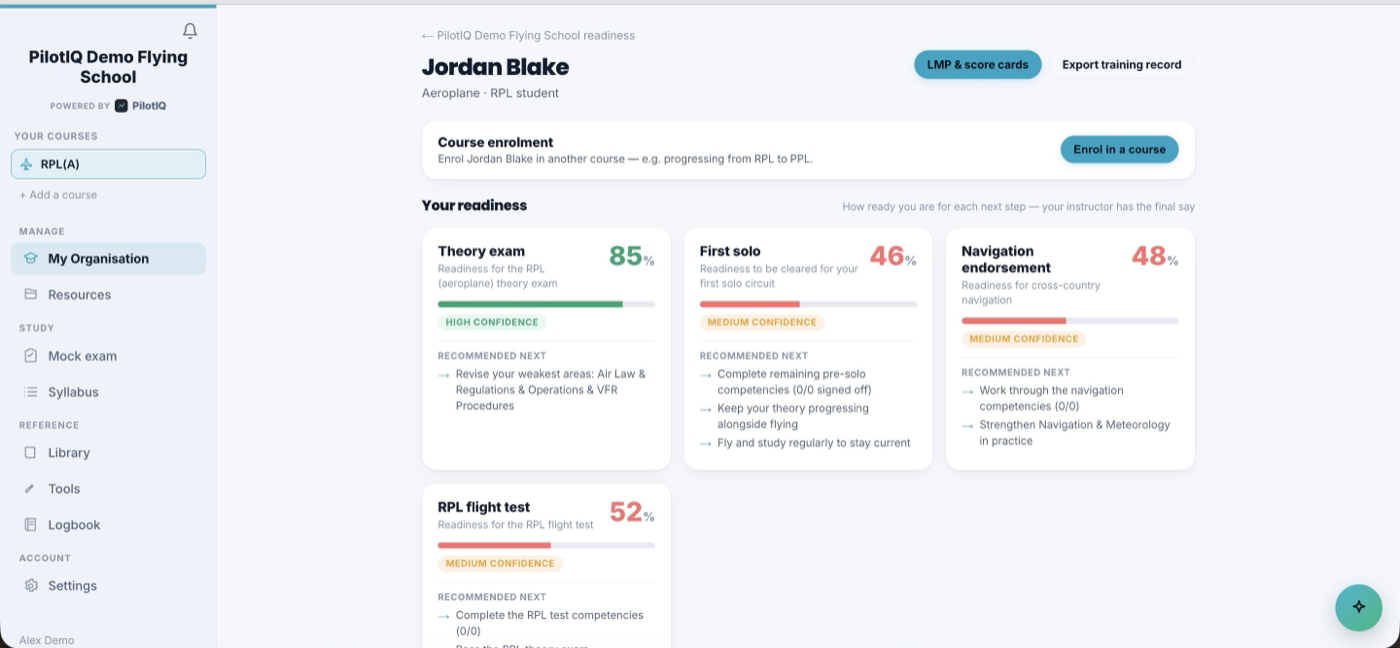
Your dashboard shows each student's progress: who's at‑risk, ready for solo, or ready for a flight test, with per‑student progress through the syllabus, milestones and competencies. Use it to plan your next lessons and briefings.
6. Certify flights (sign‑offs)
When a student needs a flight or endorsement certified, you have two ways:
- In PilotIQ — if you share an organisation, the student sends you a sign‑off request; you review and certify it.
- Verify page (no app needed) — the student shows you a sign‑off code. Go to pilotiq.com.au/verify, sign in, enter the code, and certify. The entry locks with a tamper‑evident audit trail and your name + pilot identifier (ARN / certificate number / licence number / service number) against it.
7. Standardisation & check rides
If your organisation runs testing officers, PilotIQ keeps two shared records that show up in the org workspace:
- The examiner check‑ride register — a live log of flight tests and proficiency checks conducted, by examiner, student and outcome, ready for an audit or a currency review.
- The standardisation board — your unit's shared standards, briefings and moderation notes, so every instructor teaches and assesses to the same benchmark.
8. Stay in touch
Use announcements and messages to keep your cohort informed. Your sign‑offs, ratings and currency are tracked under the organisation's Qualifications area.
Each endorsement you certify is recorded against the student's flight and locked; you remain responsible for the validity of every endorsement.